For as long as I can remember, I played with LEGOs. What fascinated me the most is that the same handful of brick types could build anything – the trick was not in the bricks but having an imagination or a plan that told you which brick goes where. This project works the same way: a single set of sources, a good plan, and multiple different ways to build and test it in.

This post is about those environments and how they fit together.
The Same Code Everywhere
The central idea of this framework is that a single set of Verilog source files can be targeted at multiple build environments without modification:
- ModelSim for cycle-accurate HDL simulation with waveform output
- Verilator for fast C++ simulation used by the test harness (calctest) and other tools
- Qt desktop application for interactive use with an integrated source-level debugger
- Qt WebAssembly for running the calculator in a browser, pixel-for-pixel identical to the desktop
- Quartus for synthesis and programming onto the physical FPGA board
Each environment reveals a different class of bugs. ModelSim catches timing issues at the signal level. Verilator runs fast enough to push thousands of test vectors through. The Qt simulator makes interactive debugging practical. WebAssembly proves the code works in a completely different execution environment in which the vision of the app can be shared with the world. The FPGA target, the actual board, is something you can touch, feel, and work with, and it is the final product of this idea.
A typical development session might look like this: write or modify a function microcode; assemble it; run the test vectors through Verilator via calctest to catch issued and regressions; switch to the Qt app if something fails and needs source-level debugging; check signal timing in ModelSim if the failure looks hardware-related, and synthesize in Quartus when the code is ready for the FPGA.
ModelSim
ModelSim is an HDL simulator from Mentor Graphics (founded 1981, Oregon, acquired by Siemens in 2017). It provides cycle-accurate, event-driven simulation of Verilog and VHDL designs with a waveform viewer that shows every signal in the design at every clock edge. This is the first tool I reach for when something is wrong at the hardware level: nothing beats watching the actual wires toggle.
The free version of ModelSim ships with Quartus. The modelsim/ folder contains a ready-to-run configuration: a batch file launches ModelSim with a Tcl script that compiles all SystemVerilog sources, loads the testbench, and runs the simulation. ModelSim includes its own waveform viewer for inspecting the results.
Another kind of simulation run is also accessible via Makefile. It uses Verilator and generates a trace file that can be viewed using GtkWave (link). Trace files grow quickly. A run of a few thousand clock cycles can produce hundreds of megabytes of traces hence the traces are limited to the region you actually need.
Verilator
Verilator is a free, open-source Verilog compiler that translates SystemVerilog into cycle-accurate C++. It originated in 1994 at Digital Equipment Corporation for co-simulating the Alpha processor’s Verilog with a C CPU model. Wilson Snyder, the original author, released the source publicly and continued development, adding SystemC output. A major C++ rewrite around 2004–2005 (version 3.0) made it a full compiler rather than a translator. Today it runs single-threaded simulation about 100 times faster than interpreted Verilog simulators. You write a C++ wrapper that drives the clock and input pins, and the generated model runs as a native binary.
The sim_main.cpp wrapper in the verilog/ folder drives the top module. The core simulation loop is straightforward:
|
1 2 3 4 5 6 |
while (!contextp->gotFinish()) { contextp->timeInc(1); top->CLOCK_50 = !top->CLOCK_50; top->eval(); // read outputs, check assertions } |
Verilator also works as a linter. Running it with -lint-only -Wall on a Verilog file catches errors faster than any synthesis tool: missing default branches in case statements, undriven signals, implicit wire declarations. I run it on every file before bothering with Quartus.
The project uses two Verilator versions: v5.x for the desktop build and v4.228 for the WebAssembly build (the latest 4.x release, which has no thread support). The make qt command in the verilog/ directory generates the verilated C++ for the default target.
Qt
Qt is a C++ framework for building cross-platform applications. The same source compiles to Windows, Linux, macOS, and Android without modification. I have been using it professionally for almost two decades (a consequence of which is that I still reach for it instinctively when I need a GUI) and it remains the most practical choice I know for this kind of project.
Qt is developed by The Qt Company (originally Trolltech, founded in Norway), which offers commercial licensing and a free open-source license for non-commercial use. The documentation is excellent and the class library is comprehensive (over 2,000 classes according to the official list, though in practice I use perhaps 50 of them regularly).
For this project, Qt wraps the Verilator-generated C++ inside a GUI application with two main components: a calculator widget that renders the LCD display and handles keypad input, and a debugger panel.
This Qt application also includes a source-level microcode debugger with breakpoints by symbol name, register inspection, and test vector execution. Post 7 covers the debugger in detail when we start writing microcode. Having a source-level debugger for microcode running on a custom CPU inside an FPGA simulator took a bit of work, but it made the development of the engine significantly more tractable.
WebAssembly
WebAssembly is a binary instruction format that runs in every modern browser. It is not JavaScript: it compiles to native machine code at load time and runs at near-native speed. The technology grew out of asm.js, a restricted subset of JavaScript that Mozilla engineer Alon Zakai developed in 2013 as a compile target for C++ code. It worked, but browser engines had to detect and specially optimize it. In 2015, Google, Mozilla, Microsoft, and Apple agreed to design a proper binary format instead, one that browsers could compile directly without guessing. The W3C standardized the result in December 2019. Emscripten, Zakai’s original compiler, is still the primary toolchain for compiling C++ to Wasm.
Qt 6 supports Wasm as a build target. Switch the Qt Creator build target from Desktop to WebAssembly, rebuild the same Calculator.pro project, and the calculator runs in a browser. The entire Verilator simulation runs client-side: no server, no backend, just the browser loading and JIT-compiling the Wasm binary.
There is one subtlety: Wasm runs sandboxed and cannot read the host file system. The ROM content is bundled as Qt resources and written to the virtual filesystem at startup. After that, the browser build and the desktop build behave identically.
The live demo is running at baltazarstudios.com/calculator.
Quartus
Quartus II 13.0 SP1 synthesizes the design for the Cyclone II device and programs the FPGA board via USB Blaster. The “Web” edition is free and sufficient. The GUI does remind you of an earlier century, but it does the job all right.
The project has two programming modes. JTAG mode (right connector, .sof file) downloads to FPGA RAM (fast and non-destructive, resets on power cycle). Active Serial mode (left connector, .pof file) programs the configuration flash (survives power cycles). During development, JTAG is the default. The .pof goes in when the firmware is ready to stay.
The FPGA Target
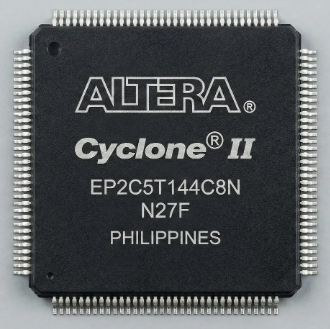
The hardware target is an Altera Cyclone II EP2C5T144C8, housed on a $5 development board from eBay. The chip has 4,608 logic elements, 26 M4K memory blocks, and 89 I/O pins, enough for this calculator and then some. Post 8 covers the board modifications and physical build in detail.
calctest: Closing the Testing Loop
The calctest harness feeds Proto-generated test vectors into the Verilated simulation and compares outputs:
# Generate test vectors
cd Pathfinding/Proto && ./proto -t -a > all.txt

# Run against the simulation
cd calctest && ./calctest ../Pathfinding/Proto/all.txt
The same test vectors can also be loaded into the Qt simulator and stepped through interactively, which is useful when a specific calculation fails and you want to see what the CPU is doing at each instruction.
This is the closed loop: Proto generates the expected results, calctest verifies the hardware produces them, and the Qt debugger lets you find the instruction where they diverged.
What This Framework Provides
All the tools listed above are free. Verilator and GtkWave are open source. Qt has a free license for non-commercial use. Quartus lite and ModelSim are free downloads from Intel/Altera. The total cost of the software stack is the time to install and configure it.
The development setup runs on Windows 10/11 with WSL2 for Verilator, GtkWave, and the assembler tools. Qt Creator runs natively on Windows. ModelSim runs on Windows. The FPGA source files live on the Windows partition and are accessed from WSL2 via /mnt/c/.
Post 5 covers the first hardware prototype (PCB, keypad, display). Post 6 is the CPU design, where the Verilog in these build environments actually starts doing something interesting.
This project is certainly impressive !!
One question I had in mind is, are all the algorithms for the complex calculations (such as trig functions or log) implemented exclusively in the FPGA ?
Not directly at the HDL level. They are implemented in microcode for a custom CPU, which itself is implemented in “hardware.”